You plan the week on Monday. By Thursday, your client is tired. Lunch is outside, workouts get skipped, and the app feels like too many taps. So they stop logging. That is the real problem most fitness apps are trying to fix.
Now think like a startup or a coach building a product. Many apps in this space look the same. Same trackers, same reminders, same “start your streak” screens. It is hard to stand out when the experience feels copied.
The demand is not small. The Business Research Company says the fitness app market will grow from $17.71B in 2025 to $22.36B in 2026.
But building from scratch is heavy work. You need client flows, coach tools, admin controls, backend, testing, and release work. Clutch says most app projects they review fall in the $10,000–$49,999 range, and a typical timeline can be 20–40 weeks.
That is why a white label fitness app development can make sense early. You start with a ready base app, then brand it with your logo, colours, plans, and onboarding. You launch faster, test demand, and only go deeper once the product proves itself.
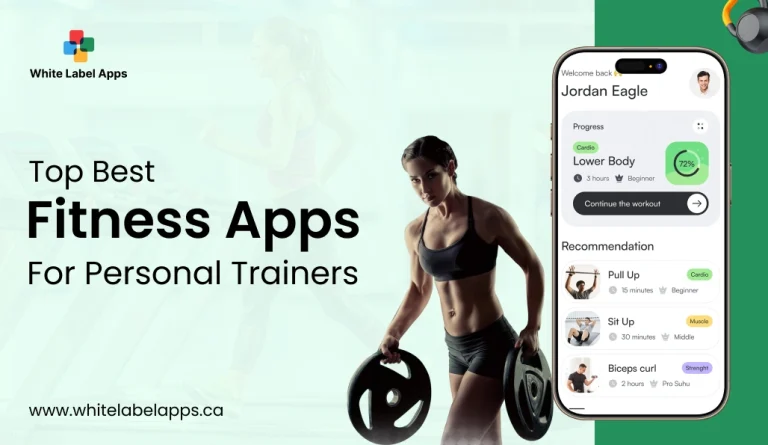
In this blog, you will get a practical list of the Top 15 fitness apps for personal trainers in 2026. You will also learn how white label works, what features matter, how to choose, what the build steps look like, and what costs to expect.
TL;DR
- Most trainers lose clients when tracking feels like too many taps. A clean app stack fixes that.
- Use coaching apps for workouts, check-ins, and messaging. Use tracker apps for food, water, sleep, and runs.
- A white label fitness app helps you launch faster with your branding, without building from zero.
- White label is best for speed and validation. Custom is best for full control.
- Start with a small pilot, then scale features based on real usage.
Key Points
- The best fitness apps in 2026 fall into two buckets: client habit trackers and trainer coaching platforms.
- Coaching platforms work best when they combine workouts, check-ins, progress, and communication in one flow.
- Tracker apps help with consistency, but only when logging is quick and simple on normal phones.
- A white label setup lets you own the client experience with your brand, pricing, and onboarding flow.
- Custom development costs more because you build the client app, coach dashboard, admin panel, backend, and QA from scratch.
- Feature overload is the fastest way to delay launch, so keep version one focused on essentials.
- A short pilot with 10 clients and two weeks of usage gives clearer answers than guessing.
- Track only a few metrics at first, like workout completion, check-in completion, and renewals.
What Are White Label Fitness Apps?
If your coaching runs on WhatsApp, notes, and screenshots, it gets messy fast. A white label fitness app helps you put workouts, check-ins, progress, and payments in one branded place. You launch faster because the base app is already built.
In simple words, it is a ready-made fitness app you can rebrand as your own. You change the name, logo, colours, and key screens, then publish it under your brand. The core system stays the same, but the look and client experience feels like your business.
Most white label setups come with three parts. A client app where people view workouts, log sets, and track habits. A trainer dashboard where you create plans, review check-ins, and message clients. And an admin panel to manage users, content, roles, and reports.
This is not the same as building from scratch. A custom app gives full freedom, but it takes longer and needs deeper planning. White label fitness apps trade some flexibility for speed, lower effort, and a system that is already tested.
One thing to be clear about. The app will not “do coaching” for you. You still need solid programs, simple onboarding, and weekly feedback. The app just keeps the whole process organised, so clients stay on track and you stay sane.
How Do White Label Fitness Apps Work?
A white label fitness app works like a ready coaching system you brand and run as your own. The provider builds the base product. You customise the look, set up your programs, and start inviting clients.
Step 1: Pick The Platform That Fits Your Coaching
Start with how you coach today. Do you run 1:1 clients, group challenges, or monthly memberships. A good platform should match that flow. Otherwise you end up fighting the tool every week.
Step 2: Add Your Branding
You replace the default branding with yours. This usually means your logo, colours, app name, and basic screen styling. Some platforms also let you customise the welcome message, email templates, and push notifications. This is what makes it feel like “your app,” not a generic fitness tool.
Step 3: Set Packages, Pricing, And Access Rules
Now you set up your plans and pricing. You can add trials, one-time programs, or recurring subscriptions. You also set rules like what happens if payment fails, or when a client cancels. These small settings save you a lot of manual chasing later.
Step 4: Build Workouts, Check-Ins, And Content
This is where your coaching goes in. You create workout plans, add instructions or videos, and set weekly check-in questions. Many tools also support habits like steps, water, sleep, or progress photos. When this part is clean, clients follow the plan without confusion.
Step 5: Invite Clients And Assign Programs
Clients join through an invite link or code. They download the app, sign up, and get assigned to a program. From day one, they can see workouts, log training, and share updates in the same place.
Step 6: Coach, Track, And Adjust From Your Dashboard
You track who is consistent and who is slipping. You reply to questions, update plans, and review check-ins without searching through chat threads. Most dashboards also show quick signals like missed workouts, incomplete habits, or stalled progress.
Step 7: Manage Renewals And Keep Things Running
Subscriptions and renewals are handled inside the system in many cases. Access stays active for paying clients and can pause when payment fails. It keeps the business side clean and predictable.
Also Check: White Label Personal Training App Development: Launch Your Branded Fitness App Faster
Our Selection Criteria For Top 15 White Label Fitness Apps
Most “best app” lists look nice, but they do not match real coaching days. We picked these tools based on what actually helps a trainer run clients, keep them consistent, and reduce follow-ups. This list is focused on white label fitness apps that can support a branded coaching business, not just a workout tracker.
1. Branding And Client Ownership
We rated apps higher when they let you put your brand on the full client journey. That means app name, logo, colours, and a clean welcome flow. We also looked for control over messages, emails, and push notifications. If your client forgets your brand after a week, the tool is not doing its job.
2. Program Builder That Saves Time
A strong app should help you build plans fast. We looked for templates, plan duplication, quick exercise swaps, and simple scheduling. We also checked if the builder works for different styles like strength, weight loss, mobility, and beginner programs. You should be able to update a plan mid-week without breaking the whole schedule.
3. Client App That Feels Simple
Clients quit apps when the interface feels confusing. We checked how quickly a user can find today’s workout, log sets, and mark progress. We also considered performance on normal phones, not only expensive ones. A good client experience feels smooth, clear, and low effort.
4. Check-Ins And Progress Tracking
Progress is not only about weight. We rated apps higher when they support photos, measurements, habit tracking, and weekly check-in forms. We also looked for dashboards that show trends like missed workouts or drop in compliance. A trainer should see problems early, not after a month.
5. Coaching Communication Tools
We checked if the app supports in-app chat, notes, and sharing files or links. We also valued tools that help trainers keep boundaries, like quiet hours or structured check-ins. Communication should feel easy for clients, but it should not drain the coach.
6. Payments, Subscriptions, And Access Control
If the app supports subscriptions, renewals, and upgrades, it makes business smoother. We looked for payment flow clarity, billing logs, and simple cancellation settings. Access control matters too. If payment fails, the system should handle it cleanly without awkward manual chasing.
7. Integrations And Data Export
Many trainers use Stripe, calendars, email tools, and wearable data. So we looked for integrations and basic data export options. Even a simple CSV export can be important for reporting and backups. We also checked smartwatch support where it fits the use case.
8. Reliability, Support, And Updates
A pretty app is useless if it breaks often. We gave more weight to tools with steady performance, regular updates, and responsive support. When something goes wrong on Monday morning, you need real help, not ticket replies after three days.
Top 15 Fitness Apps 2026
Most personal trainers end up using two kinds of tools. One set is for clients, like food, steps, sleep, and habit tracking. The other set is for coaching, like workouts, check-ins, chat, and payments. This list mixes both, so you can pick what fits your style and budget.
These apps cover the two things trainers manage daily. Coaching and habits. Some tools help clients log food, water, sleep, and runs. Others help you deliver workouts, track check-ins, and keep messages in one place. We picked a mix so you can build a simple stack without paying for five overlapping tools.
If you want a branded offer, focus on the coaching platforms first, then add one tracker app that your clients will actually use. Choose based on your coaching style, not hype. Test it on a normal phone before committing. Also, check pricing, support, and data export options today.
| App | Type | Best For | Good If You Want | Not Ideal If |
| MyFitnessPal | Nutrition Tracker | Food Logging | Calories, basic macros, quick awareness | You want coach dashboards and check-ins |
| RunKeeper | Activity Tracker | Running, Walking | GPS distance, pace, outdoor streaks | You coach strength programs inside the app |
| My Weight Tracker | Progress Tracker | Weight Trends | Simple weigh-ins and trend lines | You need full-body recomposition tracking only |
| Water Your Body | Habit Tracker | Hydration | Water reminders and daily goals | You hate notifications and reminders |
| Sleep Better | Recovery Tracker | Sleep Habits | Sleep routine tracking and wake timing | You want deep medical-grade sleep data |
| Drinkaware | Habit Tracker | Alcohol Reduction | Units, goals, drink-free days | You want training plans and workouts |
| Hevy | Strength Log | Gym Lifters | Sets, reps, PR tracking, workout logs | You need full client management and payments |
| Bearable | Wellness Tracker | Symptoms, Mood | Patterns across sleep, stress, and habits | Your clients want “only gym” tracking |
| MacroFactor | Nutrition Tracker | Macro Coaching | Structured macro goals, consistent tracking | Beginners who get overwhelmed by logging |
| Coach Catalyst | Coach Platform | Online Coaching | Programs, habits, messaging, progress | You only need a simple workout log |
| Trainerize | Coach Platform | Trainer-Led Programs | Workout delivery, client tracking, branded feel | You want a studio booking-first tool |
| My PT Hub | Coach Platform | PT Business Setup | Plans, check-ins, client management | You want a minimal, lightweight system |
| Everfit | Coach Platform | Hybrid Coaching | Programming plus habits and nutrition support | You only need scheduling and billing |
| Vagaro | Business Tool | Bookings, Services | Scheduling, payments, and client profiles | You want workout programming and check-ins |
| Mindbody | Business Tool | Studios, Classes | Booking, memberships, class management | You want a simple trainer-only coaching tool |
1. MyFitnessPal
This is a simple pick when your client needs food logging and better awareness. It is useful for calorie habits and macro consistency, even if you keep it light. I like it most for beginners who eat “randomly” and want structure. The watch-out is obsession, so keep the goal practical, not perfect.
- Food logging with a large food database.
- Calorie tracking with daily targets.
- Macro tracking (protein, carbs, fat) with custom goals.
- Faster logging tools like barcode scan and voice logging (Premium).
- Nutrition views that show nutrients and macros across days.
2. RunKeeper
RunKeeper fits clients who walk or run outdoors and need a clean way to track sessions. It helps people stay consistent because they can see the streak and distance trend. It is not meant for strength coaching, so pair it with a lifting tracker if needed. If your client hates numbers, keep it simple and track only 2–3 runs a week.
- GPS tracking for runs, walks, rides, hikes, and more.
- Live stats like pace, distance, splits, and calories.
- Monthly challenges to stay consistent.
- Training plans and guided workouts.
- Audio cues for key stats at chosen intervals.
3. My Weight Tracker
This works when a client needs a basic weight log without too many extras. It is best for weekly check-ins, not daily stress. Weight alone can mislead, so pair it with photos, waist measurement, or strength progress. If the client is anxious, you can even do “coach-only weigh-ins” and reduce app use.
- Quick weight logging with a simple history.
- BMI tracking and charts over time.
- Trend views (daily, weekly, monthly) to spot patterns.
- Body measurement tracking for better context than weight alone.
- Goal setting so clients know what they are chasing.
4. Water Your Body
Hydration apps are boring, but they work. This one is for clients who forget water all day, then drink a full bottle at night. Small reminders can fix that pattern. The only issue is notification fatigue, so set fewer reminders and make them realistic.
- Daily water goal based on your body details.
- Drink reminders to reduce “I forgot” days.
- Quick water intake logging after each drink.
- Hydration history so you can see consistency.
- Custom schedules based on wake and sleep time.
5. Sleep Better
Sleep tracking apps are great when recovery is the real problem. Clients often train hard but sleep badly, then blame the plan. This kind of app helps them notice patterns like late caffeine or late screen time. Don’t over-track, though. A simple sleep window and wake time is enough.
- Smart Alarm to wake you at a lighter sleep phase.
- Sleep diary to log sleep habits and routines.
- Sleep statistics to track changes over time.
- Dream tracker for quick notes.
- Insights that connect daily habits with sleep patterns
Also Read: White Label Fitness App: A Breif Guide
6. Drinkaware
This is useful for clients who want to cut down alcohol and understand triggers. It can help them see the pattern, like weekend drinking turning into poor sleep and cravings. Keep the tone non-judgy, or people stop logging. Also, remind clients they control what they track and share.
- Unit tracking so users know how much they drank.
- Calorie tracking linked to drinks.
- Personalised goal setting with progress tracking.
- Drink-free days tracking to build healthier patterns.
- Sleep quality tracking alongside drinking.
7. Hevy
Hevy is a strong choice for strength training logs. It suits lifters who like tracking sets, reps, and progress in a simple way. It keeps workouts focused because the next session is already planned in the log. The limit is coaching. It is not a full coaching platform, so you may still need a separate system for check-ins.
- Workout planner for strength training routines.
- Easy workout logging for sets, reps, and lifts.
- Progress stats and graphs over time.
- Community features to share and stay motivated.
- Routine library with ready programs to start faster.
8. Bearable
Bearable is more of a “life + health” tracker than a pure gym app. It can help clients who deal with fatigue, stress, gut issues, or mood swings, and want to spot patterns. The risk is tracking too many things and feeling overwhelmed. Start with 3–4 items only, then build slowly.
- Track custom symptoms, moods, and health metrics.
- Weekly reports to spot patterns.
- Customisable graphs to see trends clearly.
- Correlation views to connect habits and how you feel.
- Reminders to keep tracking consistent.
9. MacroFactor
MacroFactor is for clients who want serious nutrition tracking without guesswork. It works well for people doing body recomposition or structured fat loss. It is not for everyone, and it can feel like “too much” for beginners. You can use it when a client is ready for consistency, not just motivation.
- Macro and calorie targets that adjust based on what you log.
- Faster food logging flow with fewer taps.
- Weekly check-ins to keep plans on track.
- Multiple program styles (coached, collaborative, manual).
- Progress tracking that focuses on real data, not perfect days.
10. Coach Catalyst
Coach Catalyst is built for coaches who want workouts, habits, progress, and communication in one place. It is a coaching platform, not just a workout log, so it fits ongoing client programs. Their own positioning focuses on managing workouts, communication, and progress tracking together.
- Deliver workouts and coaching content inside one system.
- Progress tracking so clients and coaches see movement.
- Client communication tools built into the flow.
- Habit coaching with prompts and tracking.
- Push notifications to nudge client compliance.
11. Trainerize
Trainerize is a known personal training platform, especially if you want a custom branded app experience. They promote custom branded apps where your app icon, colours, and store listing can carry your brand. If you are serious about making it feel like “your app,” this is a strong option to review.
- Deliver training plans and track workouts in-app.
- Built-in food and calorie tracking for clients.
- Real-time messaging between coach and client.
- Groups and challenges for engagement.
- Custom branded app option for a stronger trainer brand feel.
12. My PT Hub
My PT Hub is a practical pick for trainers who want programming, client management, and progress tracking in one place. It suits online coaching and hybrid coaching where you need structure. The best use is when you create templates and reuse them across clients. If you build everything fresh every time, any tool will feel slow.
- Workout builder with video exercises.
- Nutrition coaching with custom plans and tracking.
- Automated check-ins for weekly accountability.
- Calendar bookings for sessions and classes.
- Programming and compliance tracking to see who follows the plan.
13. Everfit
Everfit is positioned as a coaching platform for trainers, with tools around programming and running clients in one system. Their site and app listings highlight client programming, coach organisation, and managing clients on the go. If you want a modern coaching workflow without duct-taping five tools together, it is worth checking.
- Client programming for structured workout plans.
- Macros tracking for nutrition support.
- Habit tracking for daily accountability.
- On-demand training delivery for clients.
- Coach tools to manage clients and stay organised.
14. Vagaro
Vagaro is a solid option when booking and scheduling is your biggest pain. If you run sessions like a studio, you need calendars, reminders, and payments to stay clean. This is less about workouts and more about operations. Use it when your business looks like appointments, not “programs.”
- 24/7 online booking and scheduling.
- Client management for profiles and history.
- Payment tools to collect and track sales.
- Marketing features like booking widgets and promos.
- Reports to understand daily business activity.
15. Mindbody
Mindbody is more of a business platform for fitness and wellness, especially for bookings and payments. Their pages talk about clients booking through the Mindbody app and accepting payments through Mindbody across app, online store, or in person. It can fit studios and trainers who sell sessions, classes, or intro offers and want smoother booking.
- Book, edit, and cancel appointments on mobile.
- Check-in tools for classes and services.
- Accept payments and sell services or products.
- Add new clients and manage profiles on the go.
- Capture signatures for liability waivers.
Why Launching Your Own White Label Fitness Apps Makes Business Sense?
When you sell coaching, you are also selling trust. But if your client journey lives on WhatsApp, PDFs, and scattered links, it feels messy. A white label fitness app puts workouts, check-ins, habits, and payments in one branded place, so your business looks organised every day.
1. Own The Brand
Clients remember the app they open daily. If that app shows your logo, your colours, and your tone, your brand stays in their head. With a fitness app white label setup, the experience feels like your product, not a tool borrowed from someone else.
2. Sell As Product
A private label fitness app makes it easier to package coaching. You can offer a 4-week plan, a 12-week transformation, or a monthly membership without building everything fresh each time. This also supports subscription fitness apps models, so revenue feels steadier.
3. Cut Admin Time
Most trainers waste time on follow-ups. Payments, reminders, missed check-ins, and “send me the link again” messages. A good app automates many of these small tasks, so you spend more time coaching and less time chasing.
4. Improve Retention
Clients quit when they feel lost. An app gives them one clear place to see today’s workout and log it. When the plan feels easy to follow, people stick longer, and renewals become less of a struggle.
5. Track Progress
A good system shows simple signals, like missed workouts, low habit streaks, or stalled progress. This helps you step in early and fix the drop before the client disappears. Over time, you also learn what parts of your white label fitness program keep clients consistent.
Step-By-Step Guide To Develop White Label Fitness Apps
You do not “build” everything from scratch here. You start with a ready base, then shape it around your coaching model. A white label fitness app works best when the setup is tight, not when you add every feature you can find.
1. Define Audience
Start by deciding who the app is for. 1:1 clients, group challenges, gym members, or online coaching. Each needs a different flow. A beginner wants clear steps and fewer screens. A serious lifter wants logs, PRs, and easy progression.
2. Choose Base
Pick the platform or codebase you will white-label. Check what is included in the client app, trainer dashboard, and admin panel. Also, check how updates work. If the provider ships updates monthly, ask how they handle your custom changes so nothing breaks later.
3. Plan Features
List only what you need for launch. Workouts, check-ins, chat, progress tracking, and payments are usually enough. Add extras later, like meal plans, wearable sync, or community. In white label fitness app projects, the fastest wins come from keeping scope small and clean.
4. Design Branding
Now make it look like your product. Set your logo, colours, fonts, and app name. Keep the client screens simple. Two taps to find today’s workout. Two taps to log it. If the UI feels heavy, clients stop using it, even if your program is solid.
5. Set Content
Add your workout templates, exercise library, and basic onboarding content. Build a few starter plans, like fat loss, strength, and beginner mobility. Write check-in questions that are easy to answer in 30 seconds. The goal is consistency, not essays.
6. Build Dashboard
Set up the trainer view so you can work fast. You should be able to see missed workouts, pending check-ins, and unread messages at a glance. Add tags like “new client,” “injury,” “needs follow-up.” Small organisation here saves hours later.
7. Add Payments
Decide how you will charge. Monthly subscriptions, fixed programs, or hybrid plans. Set rules for access, renewals, failed payments, and cancellations. Test payments with a real card in sandbox and live mode. Also test refunds, because it always comes up.
8. Connect Tools
Add the integrations you truly use. Email, SMS, calendar, and payment gateways come first. Wearables can be optional unless your clients demand it. Also add basic data export, even if it is just CSV. You will thank yourself when you need reports or backups.
9. Privacy Setup
Fitness apps collect personal data, so keep it clean. Add a clear privacy policy, consent screens, and simple permission prompts. Collect only what you need. If you store photos, health notes, or measurements, secure it properly and limit access by roles. This is not the place to be casual.
10. QA Testing
Test like a real user, not like a developer. Run 10 full workouts end-to-end. Submit check-ins, upload photos, and try weak network conditions. Test on an older Android phone and a mid-range iPhone. Also test push notifications, because missed reminders can break adherence.
11. Launch Stores
Prepare your App Store and Google Play listings with clear screenshots and plain copy. Keep onboarding short and guided. Do a soft launch with 10–20 clients first, then fix friction. After that, open it to the rest.
12. Post Launch
After launch, track simple metrics. Weekly active users, workout completion rate, check-in completion, churn, and payment failures. Ship small improvements every month. Also keep support fast, because one bad bug can lose trust quickly.
Average Cost To Develop White Label Fitness Apps
The basic development cost for white label solution is $1000 to $3920 and cost for custom development is 15000 to $40000. If you choose a white label fitness app, you mostly pay for customisation, setup, and testing. The base product is already there, so the work is smaller. With custom development, you pay to build the full client app, coach dashboard, admin panel, backend, and QA from zero.
| Build Type | What You’re Paying For | Typical Cost Range (USD) | Typical Timeline |
| White Label (Light) | Branding + basic setup + template plans + QA | 1,000 to 3,920 | 2 to 4 weeks |
| White Label (Standard) | Branding + plan builder setup + payments + key integrations + QA | 2,000 to 7,840 | 3 to 6 weeks |
| White Label (Heavy) | Deeper UX changes + more integrations + advanced tracking + stronger QA | 4,000 to 14,700 | 6 to 10 weeks |
| Custom (Basic App) | New build with basic features | 15,000 to 40,000 | 3 to 6 months |
| Custom (Mid-Level) | New build with more features + integrations | 40,000 to 120,000 | 6 to 9 months |
| Custom (Advanced) | New build with complex modules and multi-role flows | 100,000 to 250,000+ | 9 to 12 months |
| Custom (Enterprise) | High scale + heavy security + multiple platforms | 250,000 to 500,000+ | 12 to 18+ months |
How Do We Help You Launch White Label Fitness Apps?
You bring the coaching method. We turn it into a clean product your clients can use daily. With a white label fitness app, our job is to make the setup simple, branded, and stable before you invite your first paying client.
1. Discovery Call
We start with a short call to understand your coaching model. 1:1, group, gym members, or online programs. We also map your must-haves for launch, so you do not overbuild on day one.
2. Feature Plan
Next, we lock the first version scope. Workouts, check-ins, progress, messaging, and payments usually come first. We keep “nice to have” items for phase two, so launch does not drag.
3. Brand Setup
We apply your logo, colours, fonts, and app naming. We also clean up the onboarding flow so clients know what to do in the first 2 minutes. This is where most drop-offs happen, so we keep it tight.
4.Content Build
We help you load your first set of plans and templates. Most trainers start with 3–5 core programs, then expand. We also set check-in questions that clients can answer in 30–60 seconds.
5. Integrations Setup
We connect only what you will use weekly, like payments, email, and basic notifications. If you need wearables or extra tools, we add them only when they match your audience. Too many integrations early can create bugs and confusion.
6. QA Testing
We test the full flow like a real client. Signup, payments, workout logging, check-ins, and messages. We also test on a mid-range phone and slower internet once, because that is real life.
7. Store Launch
We help you prepare store-ready basics like screenshots, short descriptions, and a clean first-run experience. If you are not publishing to stores yet, we still set up a simple install flow so clients can join without friction.
8. Post Launch
After launch, we track simple signals. Active users, workout completion, check-in completion, renewals, and support issues. Then we ship small fixes and improvements based on what clients actually do.
Conclusion
The best fitness apps are the ones your clients will actually open. Not once, but every day. So pick a small stack that matches your coaching style. One tool for coaching and check-ins. One tool for habits like food, steps, sleep, or runs.
If you want your brand to sit at the centre, a white label fitness app makes the whole journey feel cleaner. It also cuts the daily back-and-forth that drains time. Just keep the first version simple. Launch with workouts, check-ins, progress, and payments. Add extras only after you see what clients use.
Before you commit, do a short pilot. Test it with 10 clients for 2 weeks. Track two things only. Completion rate and renewals. If those move up, you have your answer.
FAQs
1. What is a white-label fitness app?
It is a ready-made fitness app you can rebrand as your own. You change the logo, colours, and app name, then run it under your brand. The core system is already built, so you can launch faster.
2. Is White Label Better Than Custom Development?
White label is better when you want speed and a cleaner launch path. Custom development is better when you need full control over every screen and workflow. Most trainers start with white label, learn what clients actually use, then decide if custom is worth it.
3. How Long Does It Take To Launch?
A simple launch can be done in a few weeks if your branding and content are ready. The timeline grows when you add more integrations, custom screens, or complex admin rules. A short pilot with 10 clients helps you launch with fewer surprises.
4. What Features Should A Trainer Prioritise First?
Start with workouts, check-ins, progress tracking, and messaging. Add payments and access control if you sell subscriptions or programs. Keep meal plans, wearables, and community for phase two, unless your audience demands it from day one.
5. Can I Add Meal Plans And Nutrition Tracking?
Yes, many setups support meal guidance, macros, or basic food tracking. But nutrition features only work if clients actually log consistently. For most trainers, a simple weekly food check-in plus 2–3 habits works better than forcing detailed logs.
6. How Do Fitness Apps Track Steps?
Most apps use your phone’s motion sensors or pull data from systems like Apple Health or Google Fit. If a client carries the phone less, step counts can look low. That is why many coaches track trends, not perfect numbers.