
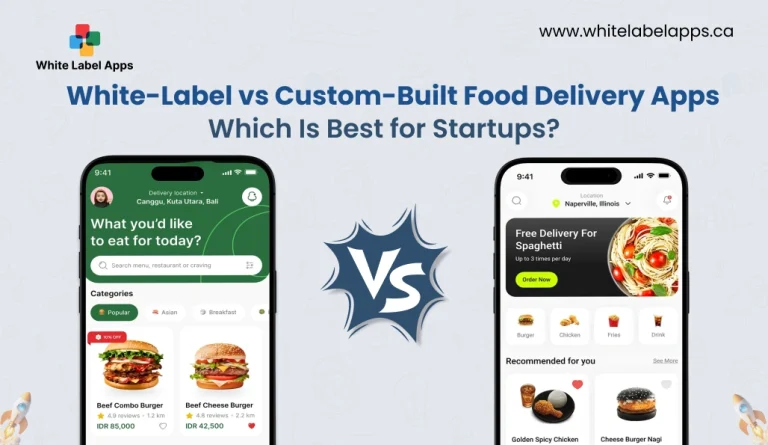
Startups in food delivery face one big choice early. Ship fast with a ready platform, or build from scratch and own every detail. The wrong call can lock you into high costs, slow updates, or a product that feels like every other app.
The timing matters too. Statista’s Online Food Delivery market outlook is cited as projecting worldwide revenue to reach $1.54 trillion in 2026. That scale brings tough competition, but it also brings opportunity for startups that can launch, learn, and improve fast. We have done deep research on what works in real food delivery apps, and we build white label solutions for our clients that launch fast, run smoothly, and stay easy to scale.
In this guide on White-Label vs Custom-Built Food Delivery Apps, you will see what each option really means for launch speed, budget, control, and long-term growth. You will also get clear pointers on when white-label makes sense, and when a custom build is worth the extra time. And you will see when a custom build is worth it, like deep integrations, unique delivery logic, and stronger ownership of data and roadmap.
TL;DR
- Online food delivery is a massive market, and it keeps growing.
- White-label is best when you want speed and lower upfront risk.
- Custom-built is best when you need control, unique UX, and deep integrations.
- Your decision should match your runway, timeline, and ops complexity.
- The “right” choice is the one that keeps launch fast and upgrades easy.
Key Points
- One public sector industry report projects global online food delivery revenue at about $1.52 trillion in 2026, showing how big the opportunity is for new brands.
- White-Label vs Custom-Built Food Delivery Apps is mainly a trade-off between speed-to-launch and long-term control.
- White-label fits startups that want to test demand, learn fast, and avoid long build cycles in the early stage.
- Custom-built fits startups that need unique workflows, strong brand differentiation, and full control over data and product roadmap.
- The biggest risk is choosing based on “features,” but ignoring maintenance, integrations, scaling, and support ownership.
- A smart approach is to start with the fastest path to real orders, then invest deeper once retention and unit economics look stable.
What Is a White Label Food Delivery App?
A white label food delivery app is a ready-made app that a startup can rebrand as its own. The core system is already built. Ordering, payments, delivery tracking, and admin panels are usually included. You mainly customize the logo, colours, menu, pricing rules, and basic workflows. This option is popular because it cuts build time and lowers early costs. White-label is the faster path to launch, especially when the goal is to test demand and start taking orders quickly.
- A ready-made food delivery app that you rebrand with your logo, colours, and business name.
- Comes with core modules like ordering, payments, tracking, and an admin dashboard already built.
- Lets startups launch faster by customising settings instead of building everything from scratch.
- In White-Label vs Custom-Built Food Delivery Apps, white-label is the quicker route to test demand and start taking orders.
Also Read: White Label Apps: What They Are and How to Resell Them
Key Features of a White Label Food Delivery App for Startups
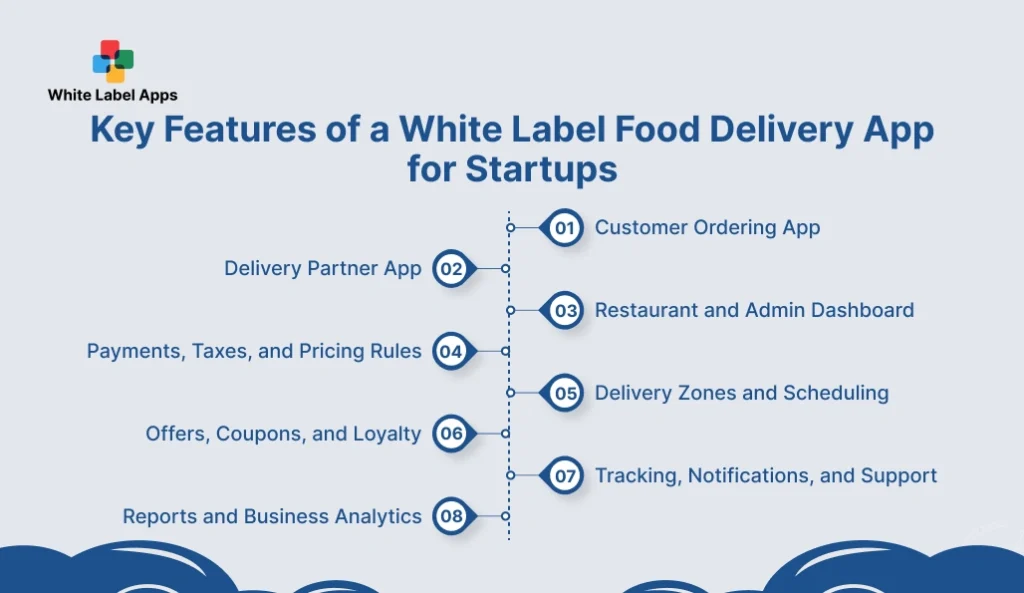
A white label app should cover the full order journey, from menu browse to delivery proof. Startups need features that work on day one, not “coming soon” items. The basics must be stable, fast, and easy for customers and staff to use.
For startups comparing White-Label vs Custom-Built Food Delivery Apps, the key features decide how fast you can launch and how smoothly you can run daily ops. The basics must be stable, fast, and easy for customers, riders, and staff.
You also need growth-ready controls like zones, offers, reports, and role access, so you do not rebuild later. When these foundations are solid, teams spend less time fixing issues and more time improving service.
1. Customer Ordering App
Customers should be able to find items fast, place an order, and pay without friction. The flow must stay smooth on mid-range phones and slow networks. A clean checkout reduces drop-offs.
- Menu browsing with add-ons and variants.
- Cart, checkout, and saved addresses.
- Real-time order status and ETA.
- Push notifications for updates.
2. Delivery Partner App
Riders need a simple screen that reduces confusion on the road. The app should support accept, pick up, and drop-off steps with proof. Clear maps and status updates reduce delays.
- Job accept, pickup, and delivery flow.
- GPS navigation and route view.
- Proof of delivery, photo or OTP.
- Availability and shift controls.
3. Restaurant and Admin Dashboard
The dashboard is where orders get managed and mistakes get prevented. Staff should update order status, manage menus, and control timings easily. A strong admin panel keeps operations consistent across shifts.
- Order queue with status actions.
- Menu and inventory management.
- Prep time, delivery time, and closures.
- Role-based access for staff.
4. Payments, Taxes, and Pricing Rules
Payments must be reliable, and refunds should be clear. Startups also need flexible pricing rules for delivery fees and surge times. Tax handling should match local requirements.
- Multiple payment options and wallet support.
- Automatic tax and fee calculation.
- Refund and cancellation handling.
- Delivery fee, minimum order, surge rules
5. Delivery Zones and Scheduling
Delivery becomes messy when zones are unclear. A good system defines service areas, timing, and capacity limits. This keeps promises realistic during peak hours.
- Zone-based delivery coverage and pricing.
- Time slots and scheduled orders.
- Order throttling during rush.
- Store-wise delivery radius control.
6. Offers, Coupons, and Loyalty
Promotions drive first orders, but the rules must be tight. The app should support coupon limits and eligibility so margins stay safe. Loyalty features help bring customers back.
- Coupon codes with usage limits.
- First-order and cart-value offers.
- Referral credits with controls.
- Loyalty points or stamp-style rewards.
7. Tracking, Notifications, and Support
Customers want clarity after payment. Tracking and alerts reduce “where is my order” calls. Support tools should make issue handling quick for both sides.
- Live tracking with status milestones.
- SMS, email, and push alerts.
- In-app chat or support ticket option.
- Issue tags, refunds, and resolutions log.
8. Reports and Business Analytics
Startups need visibility, not guesswork. Reports should show what sells, what fails, and what delays orders. This data guides staffing, menu changes, and marketing spend.
- Sales and order trend reports.
- Delivery time and delay tracking.
- Promo performance and ROI view.
- Customer repeat rate and LTV signals.
White Label Food Delivery App Use Cases by Business Type
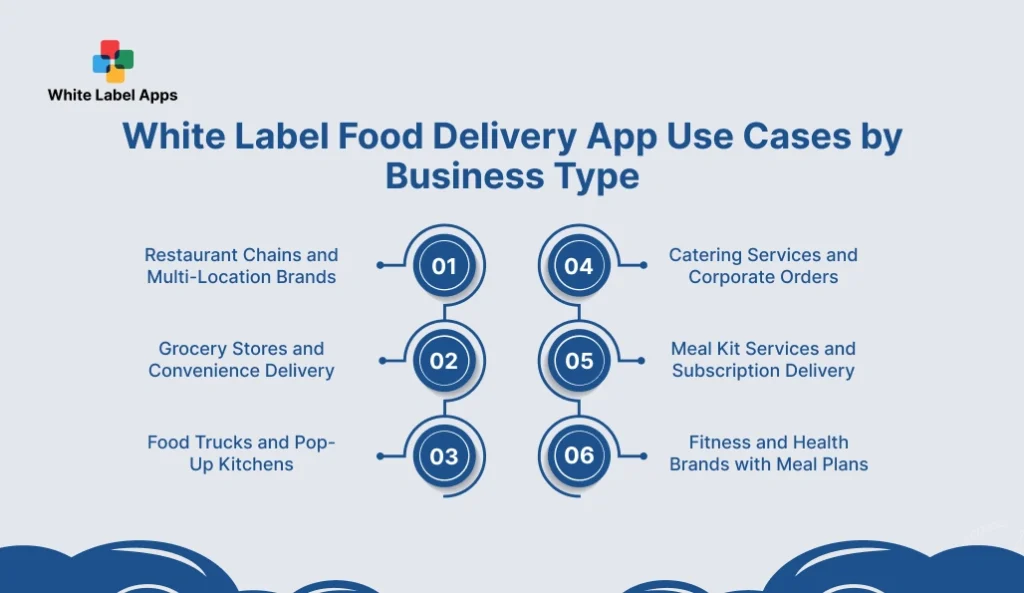
For startups comparing White-Label vs Custom-Built Food Delivery Apps, use cases change by business type. A restaurant chain needs multi-store control, while a grocery business needs inventory and substitutions. This section breaks down each model and the key features that matter, so you pick a setup that matches daily operations.
1. Restaurant Chains and Multi-Location Brands
Multi-location brands need one system that works across outlets without daily confusion. Orders, menus, and pricing must stay consistent, while each location can still run its own operations. Reporting should show what is working store by store, not only totals.
- Multi-store control. Manage multiple outlets from one dashboard with store-wise settings.
- Location-based menus. Show different menus, prices, and availability by outlet.
- Central offers and pricing. Run one promo across stores with clear limits.
- Outlet-level reporting. Track sales, peak hours, and delays per location.
2. Grocery Stores and Convenience Delivery
Grocery delivery depends on stock accuracy and quick fulfilment. Customers expect substitutions, time slots, and fast updates. The app must handle variants, weights, and frequent inventory changes without errors.
- Inventory sync. Keep stock accurate so out-of-stock orders reduce.
- Substitutions. Allow “replace with similar item” rules at checkout.
- Scheduled delivery. Offer time slots for planned grocery orders.
- Variants and weight pricing. Support pack sizes and weight-based items.
3. Food Trucks and Pop-Up Kitchens
Food trucks and pop-ups change location, timings, and menus often. The app needs quick edits, not long admin steps. Order pausing and clear updates matter most during rush hours.
- Quick location switching. Update service area fast when the truck moves.
- Limited-time menus. Add or remove items quickly for short runs.
- Pause or throttle orders. Stop new orders when capacity is full.
- Fast alerts. Push updates for pickup times and readiness.
4. Catering Services and Corporate Orders
Catering orders are larger and planned in advance. Customers need custom notes, approvals, and clear billing. Scheduling and reliability matter more than real-time tracking alone.
- Pre-orders and time slots. Take orders early with delivery windows.
- Custom notes and add-ons. Capture event details and dietary needs.
- Quote or approval flow. Add confirmation before final billing.
- Invoices and receipts. Support business billing for corporate clients.
5. Meal Kit Services and Subscription Delivery
Meal kits run on repeat deliveries, not one-time orders. Customers want easy plan control, like skipping a week or changing an address. The backend must support recurring cycles without manual follow-ups.
- Subscription plans. Weekly or monthly recurring plan options.
- Recurring billing. Auto-charge with clear renewal controls.
- Skip or pause options. Let users pause without cancelling fully.
- Delivery calendar. Show shipment days and manage changes.
6. Fitness and Health Brands with Meal Plans
Health brands need meal plans that feel personal and consistent. Customers look for nutrition details, diet preferences, and weekly scheduling. Reordering should be easy, so retention improves over time.
- Plan-based ordering. Sell weekly plans, not only single items.
- Nutrition labels. Show calories, macros, and ingredients clearly.
- Preference controls. Handle allergies, diet types, and exclusions.
- Reorder nudges. Remind users to renew or repeat past plans.
Also Read: Why Becoming a White Label Restaurant Ordering Software Reseller Makes Sense
Pros and Cons of White Label Food Delivery Apps for Startups
White label food delivery apps are a fast way to launch. In White-Label vs Custom-Built Food Delivery Apps, this option works well when you need a ready platform with ordering, payments, and tracking. It saves months of build time and reduces upfront cost.
The trade-off is control. Customisation is usually limited to what the provider allows. If you need unique workflows, deep integrations, or a very different user experience, you may hit limits.
There is also long-term dependence. Updates, pricing changes, and feature roadmaps often sit with the vendor. For startups, the best fit is when speed matters most and requirements are still evolving.
| Pros of White Label Food Delivery Apps | Cons of White Label Food Delivery Apps |
| Faster launch since core modules are already built. | Limited customization beyond the provider’s framework. |
| Lower upfront cost compared to building from scratch. | Vendor dependence for updates, fixes, and roadmap changes. |
| Built-in essentials like ordering, payments, and tracking. | Harder to build a truly unique user experience. |
| Quicker testing of demand, pricing, and delivery zones. | Integrations can be restricted or cost extra. |
| Easier setup for small teams with limited tech resources. | IP ownership and full code access may not be included. |
| Ongoing support is often bundled with the platform. | Scaling limits can appear at high order volumes or multi-region needs. |
What Is a Custom-Built Food Delivery App?
A custom-built food delivery app is made from scratch for your exact workflow, brand, and growth plan. You control features, integrations, user experience, and data rules from day one.
This path takes more time and budget, but it gives long-term flexibility. In White-Label vs Custom-Built Food Delivery Apps, custom build fits startups that need unique operations, deep integrations, or a strong product edge.
- Built around your exact business process and user flow.
- Full control over features, roadmap, and tech choices.
- Easier to add custom integrations like POS, ERP, or loyalty.
- Higher cost and longer build time, but stronger long-term control.
Key Features of a Custom Food Delivery App (Built From Scratch)
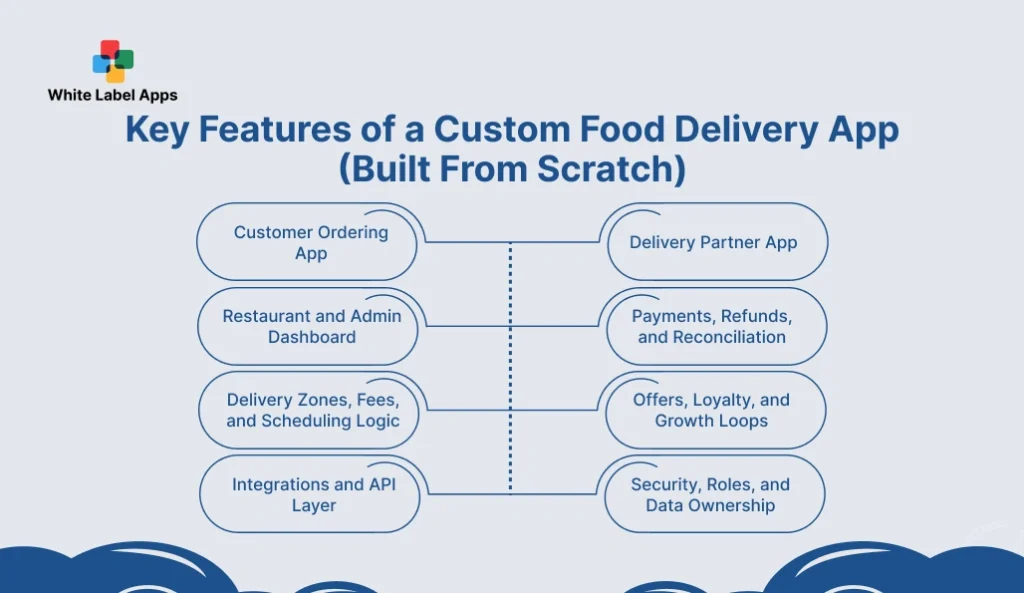
In White-Label vs Custom-Built Food Delivery Apps, the custom route gives full control over features, workflows, and data. A custom build should still cover the basics like ordering, delivery, payments, and admin control, but it can match your exact operations instead of forcing a template.
The real benefit is flexibility. You decide how checkout works, how delivery is assigned, and what gets automated. For startups, the best features are the ones that cut errors, improve delivery speed, and make repeat orders easy.
1. Customer Ordering App
A custom customer app is built around your exact buying flow. You control search, menu layout, add-ons, and checkout steps. This is where speed and repeat orders get won or lost.
- Custom checkout flow. Reduce steps, add quick pay, and control address rules.
- Personalised menus. Show items by time, location, or user history.
- Smart cart rules. Set min order, add-on prompts, and combo logic.
- Order tracking. Custom milestones, ETA logic, and clear status updates.
2. Delivery Partner App
Delivery workflows vary by city, fleet type, and service promise. A custom build lets you control assignment rules and proof steps. This improves delivery time and reduces disputes.
- Custom dispatch rules. Auto-assign by distance, load, or priority.
- Route support. Multi-drop, batch orders, and zone-based routing.
- Proof of delivery. OTP, photo, signature, or geofence checks.
- Rider controls. Shifts, breaks, earnings view, and performance signals.
3. Restaurant and Admin Dashboard
The dashboard runs daily operations. A custom panel can match kitchen flow and staff roles. It also helps reduce mistakes during rush hours.
- Kitchen workflow. Prep stages, item-level status, and hold options.
- Menu control. Outlet-wise availability, stock flags, and pricing rules.
- Role access. Separate views for manager, cashier, and kitchen staff.
- Ops reports. Delays, cancellations, refunds, and peak-hour insights.
4. Payments, Refunds, and Reconciliation
Payments are not only about collecting money. It also refunds, disputes, and clean settlement reports. A custom build can match your payment and accounting flow.
- Payment options. Cards, wallets, COD, and split payments if needed.
- Refund rules. Partial refunds, auto refunds, and clear reason codes.
- Settlement reports. Vendor payouts, commissions, and fee breakups.
- Fraud checks. Velocity limits, risky orders, and manual review flags.
5. Delivery Zones, Fees, and Scheduling Logic
Custom delivery logic is a big advantage for niche models. You can set precise rules for zones, ETAs, and surge times. This keeps promises realistic and margins safer.
- Zone rules. Radius, polygons, and store-wise coverage.
- Fee engine. Distance slabs, surge pricing, and minimum order rules.
- Time slots. Scheduled delivery, cutoff times, and capacity caps.
- Peak handling. Throttling, pausing, and wait-time messaging.
6. Offers, Loyalty, and Growth Loops
Marketing needs more than basic coupons. Custom builds allow detailed promo rules and better loyalty mechanics. This improves repeat orders without burning margin.
- Promo rules. First order, category offers, and cart thresholds.
- Loyalty system. Points, tiers, or stamp rewards with expiry rules.
- Referrals. Fraud-safe referral limits and wallet credits.
- Retention nudges. Reorder reminders and personalised deals.
7. Integrations and API Layer
Startups often need POS, inventory, or CRM connections. Custom builds can make integrations deeper and more stable. This reduces manual work and data mismatches.
- POS sync. Orders, menu, and stock updates in near real time.
- Inventory links. Item-level stock, variants, and substitutions.
- CRM and support. Tickets, customer notes, and contact history.
- Webhooks and APIs. Clean connectors for future tools and partners.
8. Security, Roles, and Data Ownership
Custom apps can be designed with security and access from day one. This is key when you scale teams and locations. It also protects customer and business data.
- Role-based access. Fine control for staff, admins, and partners.
- Audit logs. Track changes to prices, refunds, and status actions.
- Data controls. Encryption, secure storage, and access boundaries.
- Ownership clarity. Full control of code, data, and product roadmap.
Also Read: What is White Label Delivery Software? A Complete Guide
Custom Food Delivery App Examples: Who Uses Fully Custom Apps?
Fully custom apps make sense when the model is complex and scale is the target. Platforms like Uber Eats, DoorDash, Zomato, Swiggy, Deliveroo, and Grubhub use custom systems to control dispatch, pricing rules, fraud checks, and the end-to-end customer experience.
Custom builds also support constant experimentation. These platforms test changes often, ship updates fast, and adjust the app for different cities and customer groups. For startups, this does not mean you need to follow the same path from day one. It means custom builds fit best when delivery rules, integrations, and growth plans require full control. These apps also handle large volumes and multi-region operations, which often need custom logic.
1. Uber Eats
Uber Eats runs on real-time dispatch and dynamic logistics. It balances demand, driver availability, and delivery ETA across cities. The platform also depends on strong mapping, routing, and fraud controls.
2. DoorDash
DoorDash focuses heavily on local delivery operations and dispatch efficiency. It uses custom systems to manage zones, driver assignment, and peak-time load. The platform also runs constant experiments to improve conversion and retention.
3. Zomato
Zomato combines restaurant discovery with delivery at scale. Its app depends on catalogue depth, offers, and smooth checkout across many restaurants. Custom systems support partner onboarding, menu updates, and high-volume order handling.
4. Swiggy
Swiggy is built for dense, high-frequency delivery with strict time promises. It relies on custom routing and fleet coordination to keep delivery fast. The platform also supports multiple formats, including restaurants and quick commerce.
5. Deliveroo
Deliveroo is known for strong logistics and premium delivery experience in its markets. Custom tech supports rider operations, order batching, and delivery quality tracking. It also runs country-specific workflows based on local rules and demand.
6. Grubhub
Grubhub operates with deep restaurant partnerships and broad market coverage. It uses custom tools for restaurant dashboards, order management, and fulfilment coordination. The platform also supports marketing tools and loyalty-style retention features.
Pros and Cons of Custom-Built Food Delivery Apps for Startups
Custom-built food delivery apps put you in the driver’s seat from day one. In White-Label vs Custom-Built Food Delivery Apps, this route suits startups that need a product shaped around their exact workflow, brand feel, and long-term plan. It also supports deeper integrations, unique features, and cleaner control over data, without being tied to a platform’s limits.
The downside is time and spend. Building from scratch takes longer and needs solid planning, design, and testing. You also need ongoing support for fixes, upgrades, and security. If requirements keep changing or the scope is fuzzy, timelines can slip. This path works best when differentiation is important and you have a clear scaling plan.
| Pros of Custom-Built Food Delivery Apps | Cons of Custom-Built Food Delivery Apps |
| Full control over features, UX, and product roadmap. | Higher upfront cost compared to white label. |
| Custom workflows and deep integrations (POS, ERP, CRM). | Longer time to launch due to design, build, and testing. |
| Stronger brand differentiation and unique customer experience. | Requires experienced product and tech planning to avoid scope creep. |
| Clear IP ownership and better control over data. | Ongoing maintenance, security, and upgrades are your responsibility. |
| Easier to scale with custom architecture and performance tuning. | More execution risk if requirements keep changing. |
| More freedom to run experiments and build niche delivery models. | Needs a long-term dev/support team or a trusted partner. |
White-Label vs Custom-Built Food Delivery Apps: Key Differences
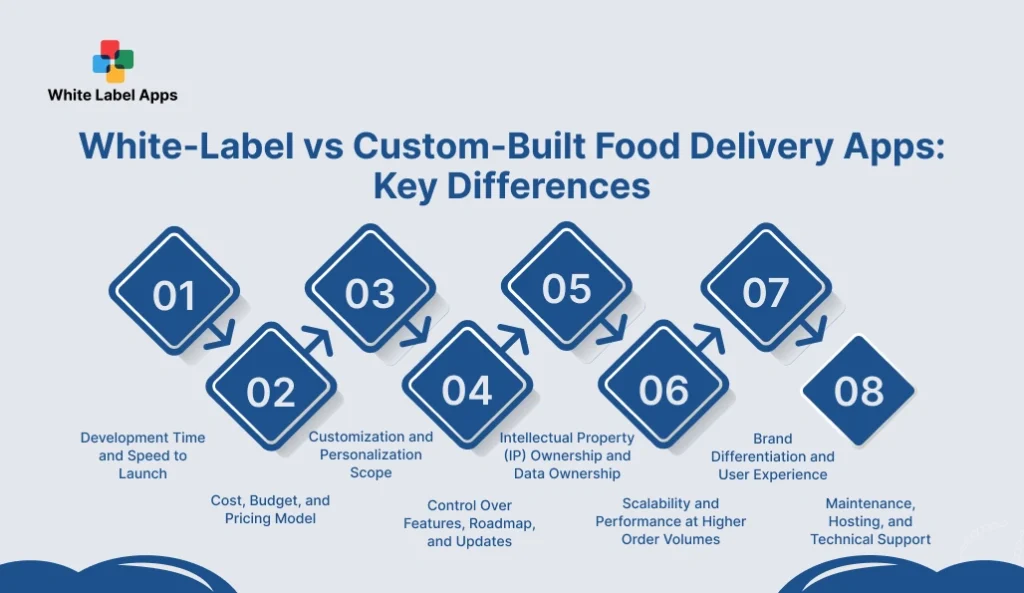
In White-Label vs Custom-Built Food Delivery Apps, the biggest differences show up after you go live. Startups usually think about speed and cost first. But long-term results depend on control, scaling, and how easily the product can evolve.
White-label platforms can launch quicker and cost less upfront, but customisation and roadmaps are often limited by the vendor. Custom builds take more time and budget, but you get stronger ownership of features, data, and user experience.
This section compares the key points, so you can choose what fits your timeline, budget, and growth plan.
| Comparison area | White-label apps | Custom-built apps |
| Development time and speed to launch | Goes live faster because core modules are already ready. | It takes longer because everything starts from scratch. |
| Cost, budget, and pricing model | Lower upfront cost, but ongoing subscription or commission fees. | Higher upfront cost, then mostly hosting and maintenance costs. |
| Customization and personalization scope | Limited to templates, settings, and what the vendor allows. | Deep changes possible across flows, features, and UX. |
| Control over features, roadmap, and updates | Vendor controls upgrades and feature roadmap. | You decide priorities, timelines, and release cycles. |
| IP ownership and data ownership | Terms vary, full code access may not be included. | Clear ownership of code, logic, and data policies. |
| Scalability and performance at high order volumes | Scales based on vendor infrastructure and plan tier. | Can be tuned for your traffic, peak loads, and architecture needs. |
| Brand differentiation and user experience | Branding is faster, but the UI can look similar to other apps. | Strong differentiation through unique UX and feature design. |
| Maintenance, hosting, and technical support | Vendor usually handles hosting, fixes, and updates. | You manage hosting, monitoring, security patches, and support. |
1. Development Time and Speed to Launch
White label wins on speed because most features are already built. A startup can go live in a few weeks when the menu, payments, and delivery rules are ready. A custom build takes longer because the design, development, testing, and revisions start from scratch.
- White label. Faster setup and quicker go-live.
- Custom-built. Longer build cycle but tailored from day one.
- Startup impact. Speed matters when you are testing demand.
- Risk point. Rushed setup still fails without testing and training.
2. Cost, Budget, and Pricing Model
White label usually costs less upfront but comes with ongoing platform fees. Custom builds cost more early, but the product is owned by you and costs can become more predictable over time.
- White label. Lower upfront, recurring subscription or commission fees.
- Custom-built. Higher upfront, then mainly maintenance and hosting.
- Hidden costs. Integrations, custom changes, and scaling charges.
- Budget tip. Match spend to runway and launch urgency.
3. Customization and Personalization Scope
White label customisation is mostly within templates and settings. Custom builds allow deeper changes, including unique flows, loyalty logic, and niche delivery models.
- White label. UI branding and basic workflow tweaks.
- Custom-built. Deep personalisation and unique user journeys.
- Best fit. White label for standard models, custom for niche models.
- Reality check. More customisation also means more testing.
4. Control Over Features, Roadmap, and Updates
With white label, the vendor controls major updates and product direction. With custom, you control what gets built next, when updates ship, and how fast issues are fixed.
- White label. Vendor-led roadmap and release cycles.
- Custom-built. Full control of priorities and release timing.
- Ops impact. Faster fixes when you own the backlog.
- Trade-off. More control also means more responsibility.
5. Intellectual Property (IP) Ownership and Data Ownership
White label terms vary. Some providers do not give full code access or IP rights. Custom builds give clearer ownership of code, logic, and data policies.
- White label. Check license terms, export options, and code access.
- Custom-built. Clear IP ownership and stronger control of data.
- Why it matters. Ownership affects valuation and long-term flexibility.
- Must-check. Data export, logs, and retention policies.
6. Scalability and Performance at Higher Order Volumes
White label platforms can scale, but you may hit limits based on provider infrastructure. Custom builds can be designed for your peak loads and tuned over time.
- White label. Scaling depends on provider capacity and plan tier.
- Custom-built. Architecture can be tuned for your traffic patterns.
- Peak risk. Rush hours, festivals, and promotions can break weak setups.
- Metric to track. App speed, crash rate, and checkout drop-offs.
7. Brand Differentiation and User Experience
White label apps often look similar across businesses. Custom apps can create a distinct experience through unique flows, UI, and features that match your brand promise.
- White label. Faster branding, but UX can feel common.
- Custom-built. Stronger differentiation through design and features.
- Startup angle. Differentiation matters when competition is high.
- Retention link. Better UX often improves repeat orders.
8. Maintenance, Hosting, and Technical Support
White label usually include support, hosting, and updates in the plan. Custom builds need a clear maintenance plan, hosting setup, and security patch process.
- White label. Vendor handles hosting, fixes, and upgrades.
- Custom-built. You manage hosting, monitoring, and patch cycles.
- Support need. Clear SLAs and incident response matter.
- Best practice. Budget for ongoing maintenance from the start.
Also Read: How White Label Online Ordering App Can Boost Sales Of Restaurants
Market Benchmarks for Food Delivery Apps: Cost, Timeline, and Adoption
In White-Label vs Custom-Built Food Delivery Apps, benchmarks usually come down to three things. Budget, launch speed, and how much control you need. Most startups begin with a tight MVP scope, then add features after real orders start coming in.
On cost, recent build estimates for a basic food delivery app often start around $20,000–$40,000, while mid-range builds can go $40,000–$100,000. Bigger multi-module platforms can reach $100,000–$250,000+, based on features and complexity.
On timeline, many teams plan 3–4 months for an MVP, while full platforms can take 3–12 months, depending on integrations and testing depth.
| Build approach | Typical timeline | Typical cost range | Notes |
| MVP custom app | ~3–4 months | ~$20k–$40k | Core ordering, basic tracking, payments. |
| Mid-range custom app | ~3–6 months | ~$40k–$100k | Adds tracking, promos, reviews, admin depth. |
| Full multi-module platform | ~3–12 months | ~$100k–$250k+ | Customer, driver, restaurant, admin, heavy integrations. |
Food Delivery App Trends Shaping Startup Decisions
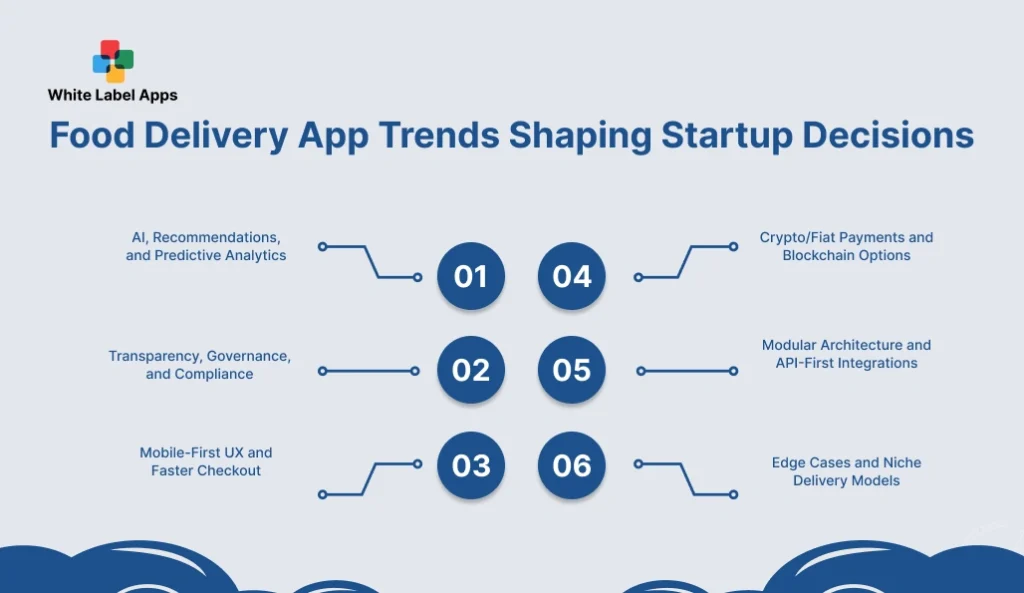
Startups are building in a market where customer expectations keep rising. Speed, trust, and smooth checkout now decide repeat orders. In White-Label vs Custom-Built Food Delivery Apps, trends matter because they shape what your app must support in year one, not year three. Some trends push teams toward white label for faster rollout.
Others push toward custom builds for deeper control, data ownership, and integrations. The smart move is to map trends to your model. Are you doing fast local delivery, scheduled orders, or subscriptions? This section covers the shifts that influence product choices, budgets, and build strategy.
1. AI, Recommendations, and Predictive Analytics
Teams are using smarter suggestions to increase cart value and repeat orders. Recommendations can show bestsellers, combos, and add-ons at the right moment. Predictive analytics also helps with demand planning, prep time, and delivery ETA accuracy. For startups, the key is to keep this practical. Start with simple rules and clean data, then move to smarter models after order volume grows.
2. Transparency, Governance, and Compliance
Customers want things to be clear. Fees should be upfront, ETAs should be close to real, and refunds should not feel like a fight. On the business side, startups need basic controls too, especially around payments and customer data. Logs, role access, and simple audit trails keep things clean. Even a small team should know who can change prices, approve refunds, or override an order.
3. Mobile-First UX and Faster Checkout
Most orders happen on mobile, often on average devices and unstable networks. Startups are prioritising speed, fewer taps, and clearer screens. Faster checkout means saved addresses, quick reorders, and fewer form fields. Small UX changes can lift conversions more than adding new features. The goal is simple. Make ordering feel effortless, even during peak hours.
4. Crypto/Fiat Payments and Blockchain Options
Some startups explore crypto mainly for cross-border payments or niche user groups. For most brands, the real need is payment flexibility, safety checks, and clean settlement reports. Blockchain options may show up in loyalty, vouchers, or partner settlements, but it is not a default requirement. If you add it, keep the scope tight. Make sure refunds, disputes, and compliance workflows stay simple.
5. Modular Architecture and API-First Integrations
Startups want systems that can grow without rebuilds. Modular design helps teams add parts like loyalty, POS sync, or new delivery zones without breaking the whole app. API-first thinking also makes integrations cleaner with payment gateways, CRMs, and analytics tools. This trend supports scaling. It also reduces vendor lock-in when you need to switch tools later.
6. Edge Cases and Niche Delivery Models
New models keep coming up, like scheduled office drops, campus delivery, cloud kitchen clusters, or subscription meals. These models have edge cases that generic flows do not handle well. Things like multi-drop routing, substitutions, custom prep windows, and capacity limits become important. Startups that serve a niche often need features that look “small” but decide the whole experience. Building for edge cases early prevents daily firefighting later.
Also Read: White Label Restaurant App Explained: Benefits, Features, & Why It Works
Key Considerations Before You Choose White-Label vs Custom-Built Food Delivery Apps
Before you choose White-Label vs Custom-Built Food Delivery Apps, get clear on what success looks like in the first 90 days. Some startups need speed more than anything else, so they can test demand and start getting repeat orders. Others need control from day one because their model depends on unique workflows, deeper integrations, or a distinct user experience.
Also think beyond the build. The real work starts after launch, when you handle peak hours, refunds, menu changes, support issues, and weekly updates. Ownership of code and data, upgrade responsibility, and support quality can shape your future costs and flexibility. This section helps you evaluate the decision with real operational factors, not only feature lists.
- Time to launch. If speed is the goal, pick the option that can go live in weeks, not months, so you start getting real orders and feedback fast.
- Budget and runway. Look beyond build cost. Add monthly platform fees, payment gateway charges, support, hosting, and future upgrades, so cash flow stays predictable.
- Workflow complexity. If your model needs subscriptions, complex delivery zones, multi-drop routing, or strict capacity limits, a basic template may not hold up.
- Integrations you cannot skip. List what must connect on day one, like POS, inventory, CRM, analytics, and accounting, because integrations often decide timelines and cost.
- Ownership and portability. In White-Label vs Custom-Built Food Delivery Apps, check who owns code and data, how exports work, and what happens if you switch vendors later.
- Scalability under peak load. Think about rush hours, festivals, and big promo days. Your app should handle high traffic without slow checkout or crashes.
- Brand differentiation. If you are entering a crowded market, a unique UX, loyalty logic, or niche features can be the difference between “one-time” and “repeat.”
- Support and maintenance reality. Be clear on who fixes bugs, ships updates, handles security patches, and responds during outages, because this becomes daily ops work.
White-Label vs Custom-Built Food Delivery Apps: Which Option Fits Your Startup?
In White-Label vs Custom-Built Food Delivery Apps, the right choice depends on your stage, your model, and how soon you need real repeat orders as proof. If you want to launch quickly, test demand, and keep early spending tight, white-label is often the better fit. You get the essentials and can learn from live orders before putting in bigger money.
If your workflow is truly different, or you need deep integrations, stronger data control, and a clear product edge, a custom build makes more sense for the long run. It needs more time and budget, but you own the roadmap and can scale without platform limits.
Conclusion
Startups in food delivery rarely fail because they missed one feature. They fail because launch got delayed, budgets stretched, or daily operations broke down after the first rush. That is why White-Label vs Custom-Built Food Delivery Apps should be decided based on your stage and your actual workflow, not what looks impressive in a demo.
If you need to go live fast, test demand, and keep costs tight, white-label is a strong first step. It gets you taking orders, learning from customers, and fixing basics like pricing, delivery zones, and menus. If your model needs deeper integrations, special delivery rules, or a real product edge, custom is the better long-term path because you own the roadmap and the data.
Choose what fits your next 90 days. Then scale with clear metrics, steady updates, and clean operations.

whitelabelapp
Related Articles
White Label Personal Training App Development: Launch Your Branded Fitness App Faster
Your day is full of small fitness tasks. A client asks for the plan again. Another forgets to pay. Someone says the video link is not opening. It all happens on WhatsApp, notes, and screenshots, and it gets messy fast. A white label personal training app helps you put workouts, check-ins, payments, and progress in […]
Read More
Top 15 White Label Reseller Programs That Deliver Big Profits in 2026
If you have ever tried reselling services, you know the truth. The pitch is easy. Delivery is where most resellers bleed time and profit. That is why this list is not based on “popular names” or random directories. We did deep research before writing this blog. We reviewed reseller program pages, service menus, white label […]
Read More